Put every BigCommerce customer in the right group
You write a rule in plain words. When a customer matches it, Usher sets their customer group, adds them to a segment, or sends a webhook. The price is flat, with no limit on rules.
14-day free trial, billed through BigCommerce. Free on sandbox stores.
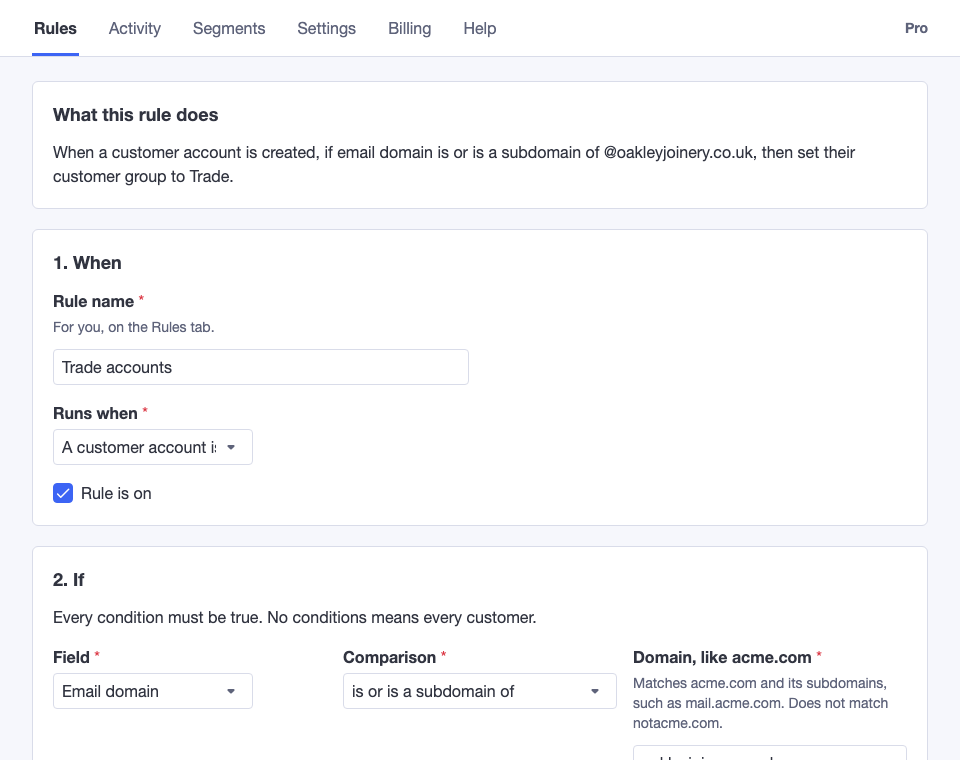
When a customer account is created, if their email domain is acme.com or a subdomain of it, then set their group to Trade.
- Works on Stencil and Catalyst storefronts
- Stores customer ids and numbers, never names or emails
- Never changes your products or prices
- Free on sandbox stores
Lists every rule and what it last did
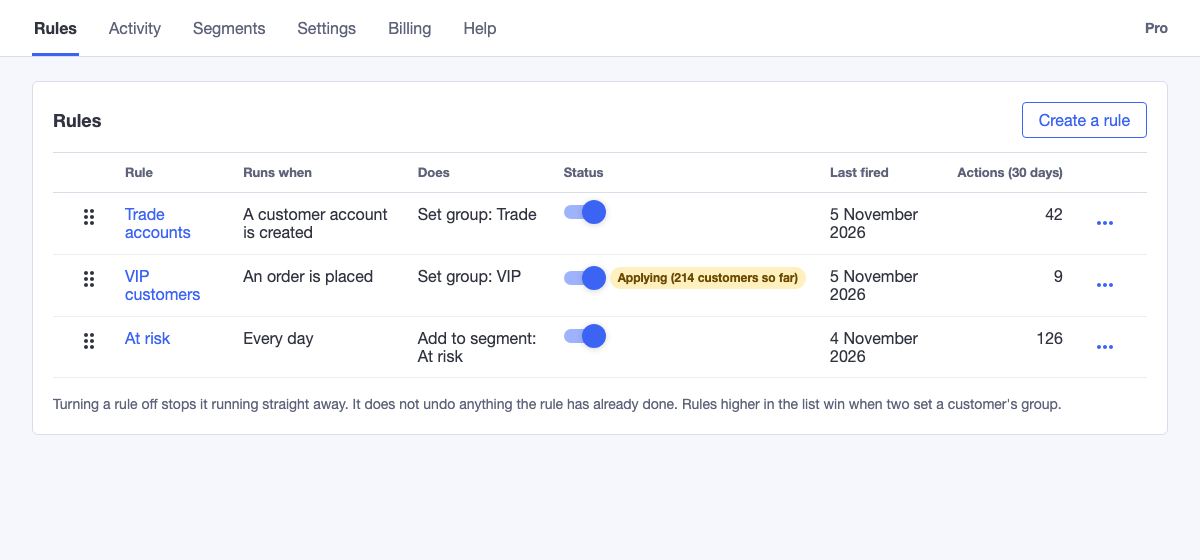
The Rules tab has one row per rule: when it runs, what it does, when it last fired and how many actions it took in the past 30 days.
- Switch a rule on or off in its row
- Rules higher in the list win when two set the same customer's group
- A rule shows its progress while it works through your existing customers
Set up your first rule in three steps
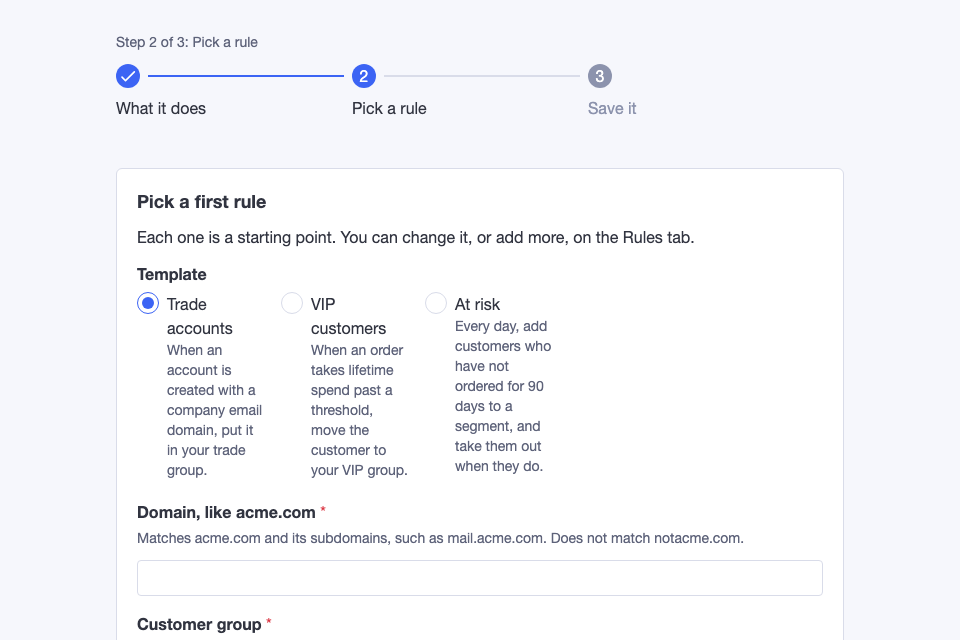
Pick a template
Usher opens on three starting points: Trade accounts, VIP customers and At risk. Choose one and fill in the one or two values only you know.
Check it in plain words
The rule builder writes your rule back as a sentence. Change the trigger, add conditions such as country or sales channel, or choose a different group.
See what it did
Usher says how many existing customers match before it touches any. Once the rule is on, the Activity tab lists every change and the reason for it.
Shows why each customer matched
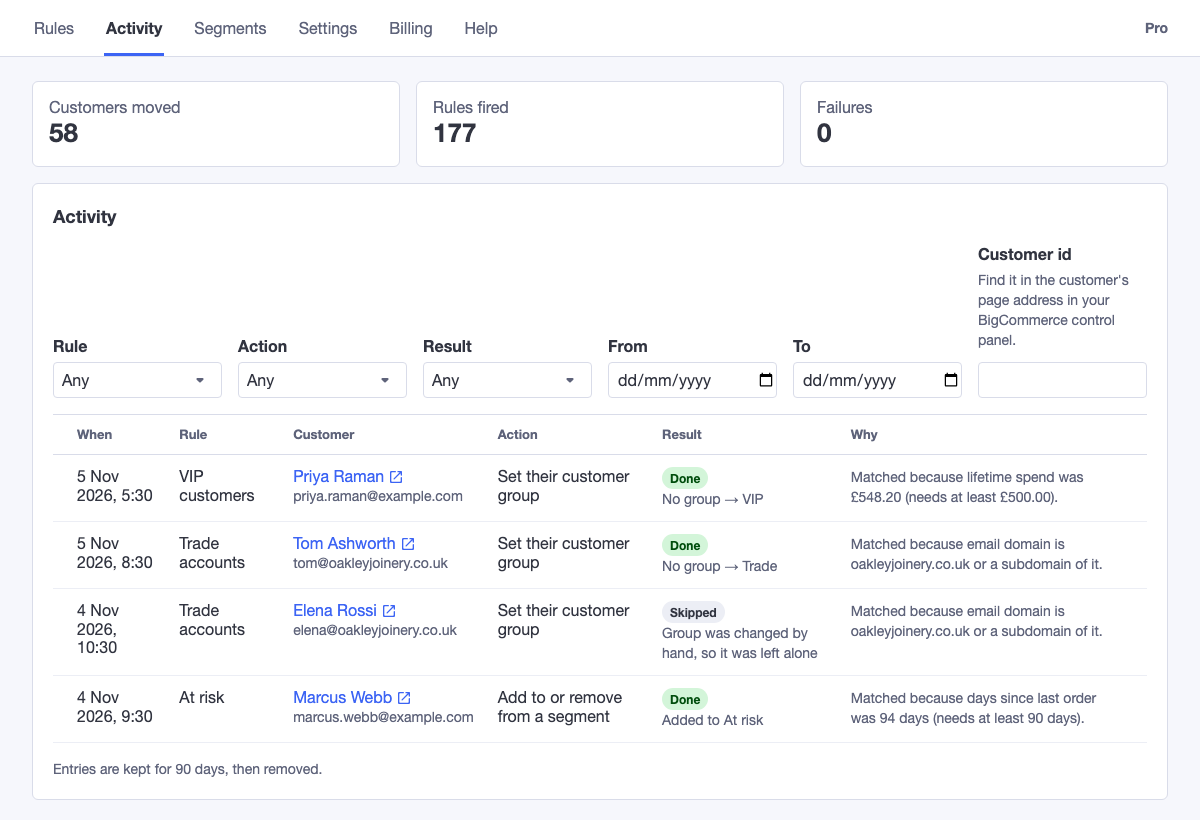
Every row on the Activity tab names the rule, the customer, the result and the reason in plain words, such as "Matched because lifetime spend was £548.20 (needs at least £500.00)". When Usher skips a customer, the row says why. Entries are kept for 90 days.
Puts trade accounts in the trade group
When someone signs up with a company email domain, Usher moves them into your trade or wholesale group before they see a price. Customers who already match can be moved too, once you have seen the number.
Promotes customers to VIP when spend passes your line Pro
Set the threshold in your own currency. When an order takes a customer past it, they move to the VIP group. If a refund takes them back under, the rule can put them back or leave them where they are.
Finds customers who have stopped ordering Pro
A daily check adds customers whose last order was 90 days ago to an At risk segment, and takes them out again when they order.
Tells your other tools with a signed webhook Pro
A webhook rule posts the customer id to Klaviyo, n8n, Zapier or your own code when someone starts or stops matching. Try it in CommerceHook before you point it at your own endpoint.
Matches on country and sales channel
Rules can check where a customer lives, which sales channel their account came from and which channels they have ordered on, so an account made on your wholesale storefront gets its group without an email domain.
Who Usher is for
Stores with a trade side
If trade customers see different prices, someone has to put each new account in the trade group. Usher does it as the account is created.
Stores that price by tier
VIP, wholesale and loyalty groups stay current as spend changes, without anyone exporting customers and sorting them by hand.
How a rule works
A rule reads as one sentence: when this happens, if these are true, do that.
- When: an account is created, an order is placed, an order’s status changes, or once a day for rules about time passing.
- If: email domain, country, sales channel, current group, lifetime spend, order count, first order value, days since the last order or account age. Every condition must be true.
- Then: set the customer group, add to or remove from a segment, send a webhook.
A rule acts when a customer starts matching it and, where that makes sense, reverses when they stop. It never acts twice for the same change, however often BigCommerce retries the webhook. Saving a rule shows how many existing customers it matches before it touches any of them. Two group rules that both match resolve by their order in the list.
The install guide covers setup, and the guide to putting trade customers into a group automatically walks through a first rule.
What Usher does not do
- It cannot see a company name or a VAT number, so a buyer on a personal email address does not match a domain rule.
- It does not check that a business is genuine. A rule goes by the domain, so use it for domains you trust.
- It does not change products, prices or what is in an order. Setting a customer group is the only change it makes to a customer in BigCommerce.
- It needs a BigCommerce plan with Customer Groups, which is Plus and above.
Pricing
One flat price with no charge per rule, customer or action. Both plans start with a 14-day trial, and the charge appears on your BigCommerce invoice.
Common questions
Will it change groups I set by hand?
Not by default. If Usher moved a customer and you later moved them yourself, Usher leaves them there and says so on the Activity tab. A setting on the Settings tab makes the rules win instead.
What about guest checkouts?
Guests are skipped for spend and order counts, because their orders belong to no account. Usher does not move a guest order onto an account.
What does Usher store?
Customer ids, order totals, dates, group ids, your rules and segments, and a log of what Usher did for 90 days. Email and country are read from BigCommerce when a rule runs and dropped. No names, emails or addresses.
Does it work on a sandbox store?
Yes, free, with every feature on. Try a rule on a Partner sandbox before it goes near real customers.
Does it work on Catalyst?
Yes. Usher changes the customer group in BigCommerce and adds nothing to your storefront, so it behaves the same on Stencil and Catalyst.
What happens if I uninstall?
Usher deletes everything it holds about your store. Groups it already set stay set, because they live in BigCommerce.
Which BigCommerce plans does it need?
Plus and above, because those are the plans with Customer Groups. On Standard there is no group to set.
Install Usher on your BigCommerce store
Once it is installed, pick a plan on the Billing tab. Your 14-day trial starts then.