Label the AI images in your BigCommerce store
You mark which product images were made or changed with AI. Footnote shows a small label on each one in your storefront and records who decided, and when.
14-day free trial. From $12 a month, billed by BigCommerce.
- Works on Stencil themes, and on Catalyst from 1.4 (beta)
- Sets no cookies, so labels show whatever shoppers pick in your cookie banner
- Never edits your image files
- The app and this site in 13 languages
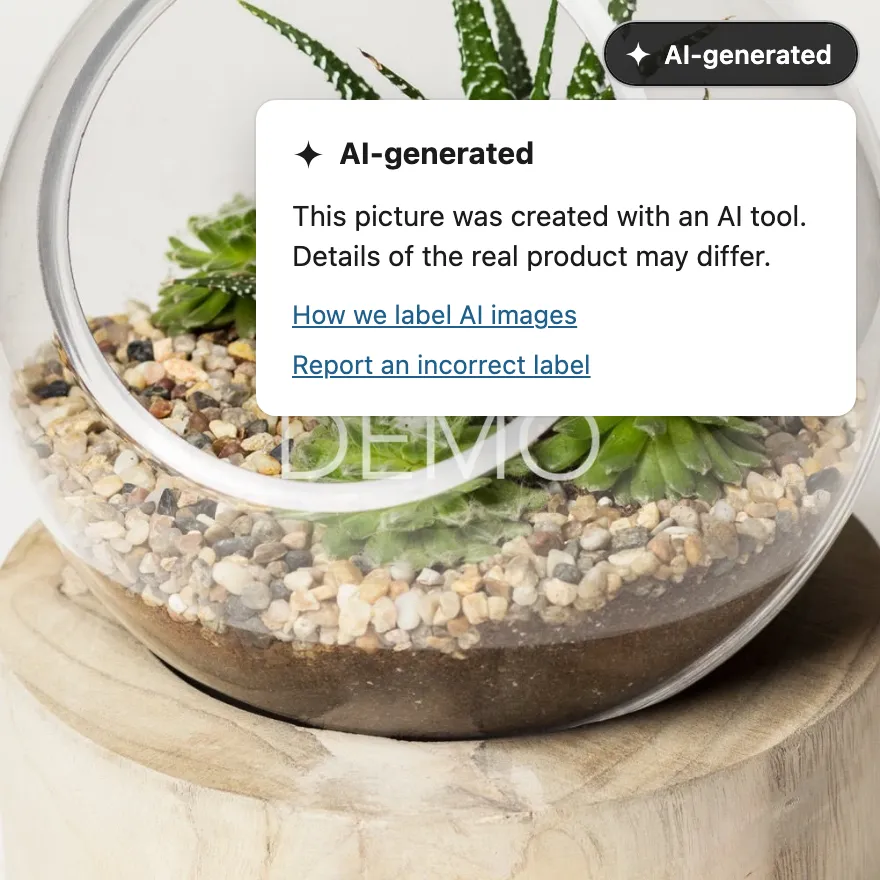
Shows a label on the images you mark
Shoppers see a small "AI-generated" or "AI-edited" pill in the corner of each image you marked. It sits over the picture, so nothing on the page moves, and screen readers announce it as a button.
- Product pages, category and search results, quick view and zoom
- The home page carousel and content images, on Pro
- A compact pill on images under 160 px wide


Set up labels in three steps
Review your product images
Footnote lists every product image with a status. It suggests the ones that may use AI, from filenames, alt text and, on Pro, image metadata, and shows the reason for each.
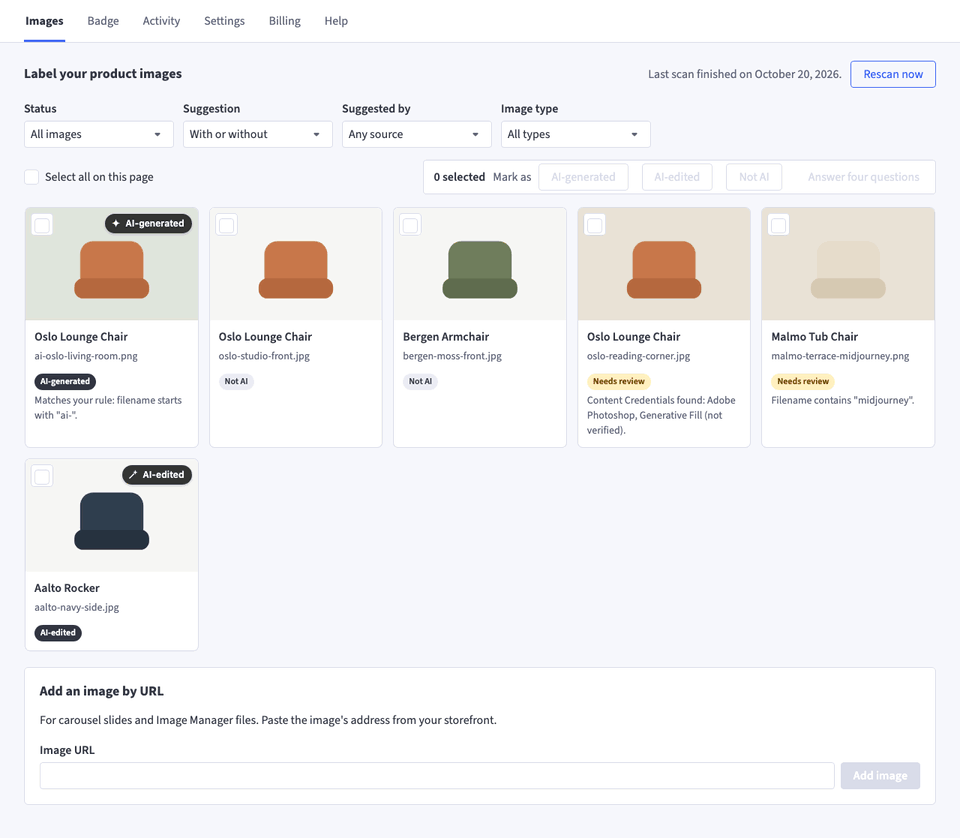
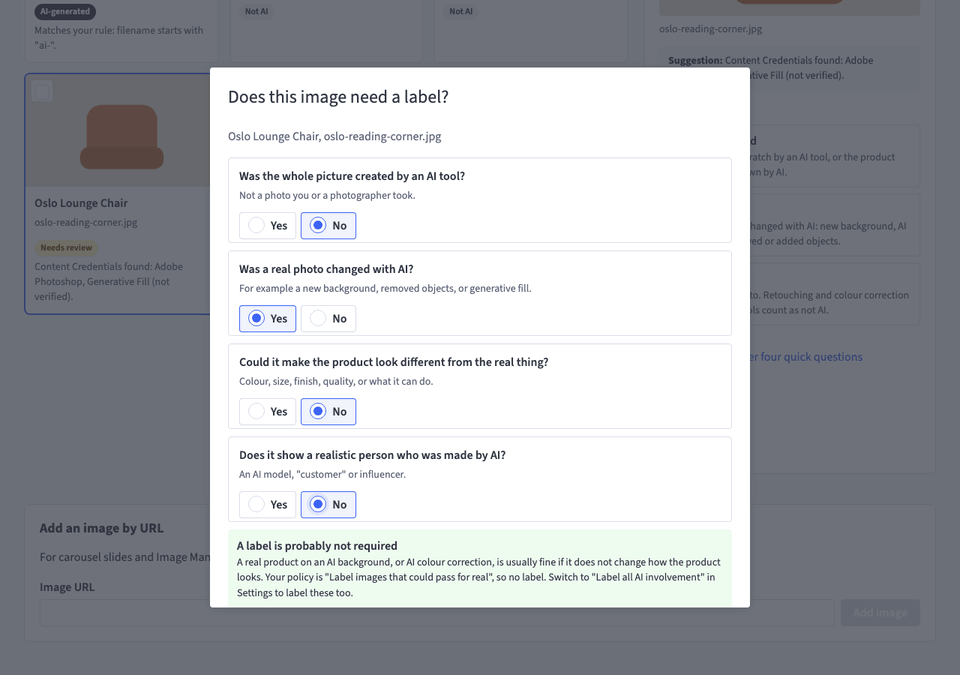
Mark the ones made or changed with AI
Choose AI-generated, AI-edited or Not AI, or save a house rule such as "filename starts with ai-". When you are unsure, four questions based on the European Commission tests suggest an answer.
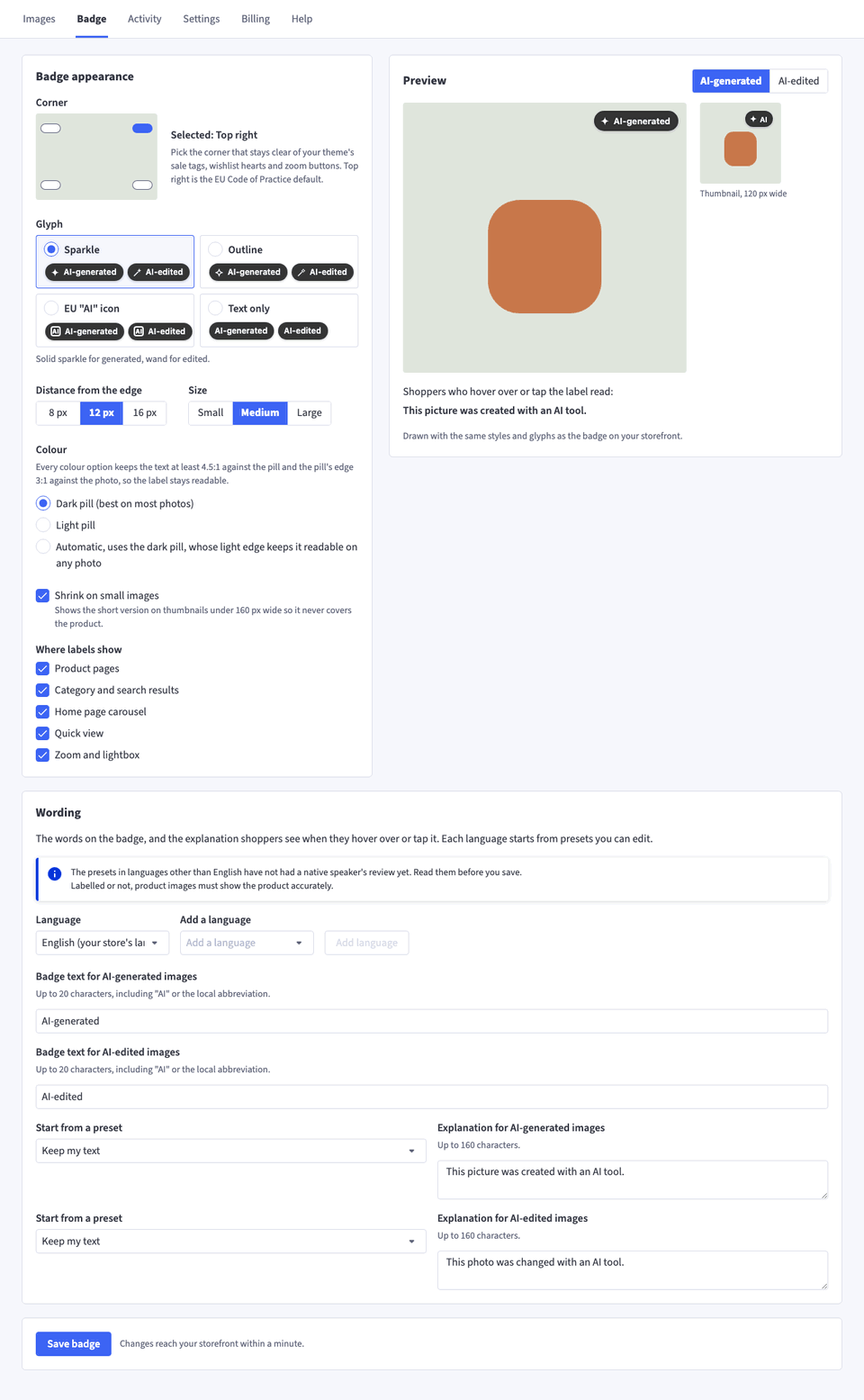
Switch on labels
Pick the corner and style on the Badge tab, then switch on Show labels in Settings. Labels reach a Stencil storefront within about a minute. Until you switch them on, Footnote adds no script to your storefront.
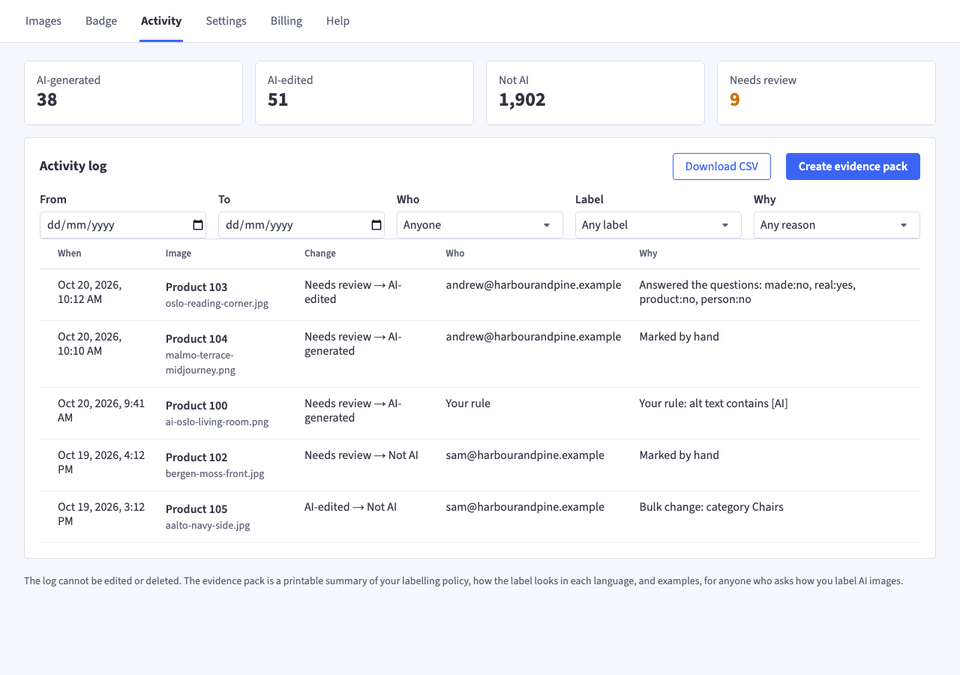
Records who labelled what, and when
Every change goes into a log that cannot be edited: the image, the old and new label, who changed it and why. Download it as a CSV on any plan.
Re-checks a product from its BigCommerce page
After you change a product's images, re-check them in the Footnote panel on its edit page in BigCommerce instead of waiting for the next catalogue check.
Reads Content Credentials and IPTC metadata Pro
Footnote reads the metadata many AI tools write into a file, such as "Adobe Photoshop, Generative Fill", and suggests those images. Missing metadata does not mean no AI was used.
Starts the shopper text from presets
Write the label and its explanation yourself, or start from presets in 13 languages. Every colour option keeps the text at 4.5:1 contrast or better.
Matches each storefront's language
Save the wording in more than one language and each storefront shows the one that matches its own language.
Prints an evidence pack Pro
Your labelling policy, your label in each language and labelled examples, in one printable summary for anyone who asks how you label AI images.
Keeps the storefront script small
It is under 6 KB gzipped, uses no browser storage and does nothing on pages without a labelled image.
Who Footnote is for
Stores with shoppers in the EU
Article 50 of the EU AI Act has applied since 2 August 2026. The European Commission reads it as covering stores outside the EU whose images EU shoppers can see.
Teams that make product images with AI
If your team or agency uses AI for models, room scenes or retouching, Footnote keeps a list of which images used it and who marked them.
Stores with more than one storefront
Pro shows labels on every storefront on the store, Stencil or Catalyst. Essentials covers your default storefront.
What the law asks
Since 2 August 2026, the EU AI Act requires stores to label realistic AI images of people, products or places that could pass as real, where EU shoppers can see them. A photorealistic AI model wearing your jacket is very likely covered. So is an AI image that makes the product look better than it is. A real product photo on an AI-generated background usually is not.
The European Commission’s guidelines on Article 50 set out the tests, with examples close to product photography. The UK has no labelling law. Our guide, Do I need to label AI product photos?, goes through both in plain English, with links to the sources.
A label tells shoppers an image was made or changed with AI. It does not make a misleading image acceptable. Your product images still need to show what the shopper will receive.
What Footnote does not do
- It does not decide which of your images the law covers. That is your call, and Footnote records it as yours.
- It does not detect AI images. It suggests images that may use AI, and "no metadata found" does not mean an image was made without AI.
- It does not add metadata to your files. Machine-readable marking, such as Content Credentials, is the job of the AI tool that made the image.
Pricing
Billed in US dollars on your BigCommerce invoice, and free on sandbox stores. Pay yearly and get 2 months free.
Essentials
$12 per month
For one storefront and up to 250 labelled images.
Pro Recommended
$29 per month
For every storefront, with no cap on labels.
Common questions
Does Footnote make me compliant with the EU AI Act?
No app can promise that, and we do not. Whether an image needs a label, and whether it could mislead shoppers, are judgements about your own images, and they are yours to make. Footnote shows the labels you choose, styled in line with the EU Code of Practice guidance, and keeps a record of your decisions in case anyone asks how you label. It does not decide which images the law requires you to label and is not legal advice.
Does every AI image need a label?
No. Under the EU AI Act the duty covers realistic images that could pass as real, such as a photorealistic AI model or an AI render that makes the product look better than it is. A real product photographed and placed on an AI background usually does not need one. Some stores label all AI involvement anyway, and Footnote supports that as a policy.
My store is in the UK or the US. Does any of this apply to me?
The European Commission reads the EU rules as reaching stores outside the EU whose images EU shoppers can see, so a store that sells into the EU is likely covered. The UK has no AI labelling law, but the rules on misleading ads apply to AI images in full.
Do shoppers who decline cookies still see the labels?
Yes. Footnote sets no cookies, uses no browser storage and sends nothing about your shoppers, so its script is registered as Essential in BigCommerce and loads whatever the shopper picks in your cookie banner.
Does Footnote change my image files?
No. The label is drawn over the image on your storefront, and your files are left as they are. That also keeps overlays out of your Google Shopping feed, which Google does not allow.
Will it slow my store down?
The script is under 6 KB gzipped, and it does nothing on pages without a labelled image. The label sits over the image, so nothing on the page moves when it appears.
Install Footnote on your BigCommerce store
Once it is installed, pick a plan on the app's Billing page. Your 14-day trial starts then.